Document Collection You know which documents you need. Getting them is the hard part.
Clover collects supplier documents in one guided request: COIs, W-9s, certifications, agreements, and attestations. Each one is checked as it arrives, so what lands on file is complete and correct the first time.


 Then Jordan reviews
Suppliers managed in Clover include















Today
Where document collection breaks down
-
Every document request is an email thread.
You ask a supplier for a COI, a W-9, and a business license. You get the W-9, last year's COI, and a question. Three replies later you're still missing one. Multiply that by 2,000 suppliers and 3 to 4 document types each, and nobody can say who has sent everything.
-
What comes back isn't what you asked for.
Coverage below your minimum, the wrong entity named, an unsigned W-9, a scan nobody can read. Someone opens every file, checks it against requirements that live in their head, and goes back to the supplier to start again.
-
The auditor asks for a document. You're not sure you have it.
An auditor, a regulator, or your own risk management team asks: "Show me the current COI for this supplier." You check the shared drive. You check email. You find three versions and aren't sure which is current. The audit is tomorrow.
In Clover
Ask once. Checked on arrival. Complete on file.
Define what each supplier category owes and send it as one guided task. Clover checks every document as it arrives and keeps the complete set on the supplier's record.
Say which documents each supplier needs
Pick the documents per supplier category and the values Clover AI checks on each. Set it once as a workflow, and every supplier gets the same request.
The supplier uploads everything in one guided task
The supplier sees each required document with what it must show, uploads it in place, and sees what is still missing. Nothing goes by email.
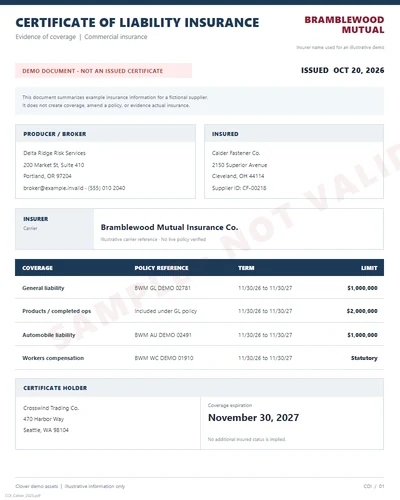
AI-powered document validation at the point of upload
When a supplier uploads a document, Clover AI reads it and validates it against your requirements: the right fields, valid dates, values that meet your thresholds. Coverage below your minimum, an expired certificate, a mismatched name, caught and sent back immediately. Your team doesn't see it until it passes.
A complete file on the supplier's record
When the last document passes, the supplier's file is complete: every document on their profile, with what Clover checked and who accepted it. You see at a glance who is complete and who still owes something.
Every document keeps its record
Each document keeps its log: who requested it, what the supplier uploaded, what Clover AI checked, what was sent back and why, and who accepted it. When an auditor asks, the answer is on the record, not in an inbox.
Your shared drive becomes a system. In weeks, not months.
 +1,998
Every industry collects documents from suppliers. Nobody does it well.
COAs, food safety certifications, allergen declarations, and FSMA 204 traceability documentation, collected and tracked across hundreds of suppliers.
- COAs
- Food safety certifications
- FSMA 204
Supplier compliance documentation, signed agreements, insurance certificates, and product data attestations, enforced as part of your supplier standards program.
- Agreements
- Insurance
- Attestations
Quality certifications, ISO documentation, material compliance declarations, and signed agreements, collected and checked across your tiered supply base.
- ISO
- Material declarations
- Agreements
W-9s, insurance certificates, SOC 2 attestations, and signed agreements, collected and tracked across every supplier and service provider.
- W-9
- SOC 2
- Insurance
Credentialing documents, insurance certificates, regulatory certifications, and compliance attestations, collected and verified across suppliers, distributors, and GPOs.
- Credentialing
- Insurance
- Certifications
Cannabis, automotive, scientific and lab, education, and more. If you collect documents from suppliers, this workflow applies. The document types change; the process doesn't.
- Any document
- Any requirement
Frequently asked questions
Through a guided task in their portal. They see each required document and what it must show, upload it in place, and see right away if something fails a check, with the reason. They fix it in the same task; nothing goes by email.
Yes. When a supplier uploads a COI, Clover AI extracts the policy holder, coverage amounts, expiry date, and named insureds, then validates them against your specific requirements. If coverage is below your minimum, the named insured is wrong, or the policy is expired, the supplier is told immediately and asked to resubmit. Your team does not see the document until it meets your requirements.
Clover handles any document type you require from suppliers: certificates of insurance, W-9s, signed agreements, SOC 2 attestations, ISO certificates, business licenses, and any custom document type you define. Each document type can have its own validation rules.
A shared drive stores files. Clover manages the process around those files, including who requested the document, when it was submitted, what validation it passed, and who reviewed it. Every document carries a complete audit trail. When an auditor asks for a current COI, you get one definitive answer, not three versions in a folder.
Yes. Every document keeps its log: who requested it, what the supplier uploaded, what Clover AI checked, what was sent back and why, and who accepted it. Earlier submissions are kept, never overwritten, and the complete history for any supplier is one click away.
Onboarding brings a new supplier on: company details, banking, agreements, and documents in one process. Document collection works for any supplier at any time: a new requirement, a new site, or getting ready for an audit.
Certificates & Renewals takes over. Clover keeps each document's expiry date, sends the supplier a renewal task on your schedule, and checks the replacement before it goes on file.
Most organizations go from kickoff to live document collection in 2 to 4 weeks. You define your document requirements and validation checks through configuration, not custom development. If you already know what documents you need by supplier category, setup is straightforward.
Yes. Clover pushes document data and status (what's on file, what's validated, what's still missing) to your ERP, vendor master, or compliance system through its API. The document lives in Clover with its full history and audit trail; the current status flows to wherever your team already works. Clover runs the collection and validation; your systems of record stay the source of truth for everything else.
See document collection run on your requirements
We'll walk you through a live document collection workflow (from the first request through AI validation to a complete supplier file) tailored to your document types.
What we promise
- We start with your problems, then show you how Clover would solve them. A real walkthrough with someone who knows compliance operations.
- Typical deployments cost less than a single compliance coordinator.
- SAML 2.0 SSO
- AES-256 + TLS 1.2+
- Immutable audit trail
- SOC 2 (in progress)
- Security questionnaire on request
- Security details